
WHAT IS
3D RAD?
CLICK HERE
TO FIND OUT!
AnimationControls

After you have linked this object to a SkinMesh object which uses an .x file with a multi-set animation in it, you will be able to associate up to 32 animation sequences to as many keys (or gamepad/joystick controls) by using an user-friendly interface instead of a script.
For an example of usage please see the demo project called AnimationControlsDemo (in 3D Rad, press Ctrl+O and select the project).
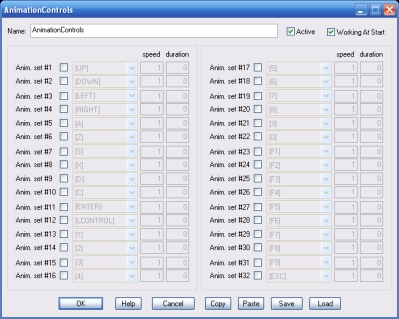
Animation sequences (sets) in an .x file are numbered. The order depends on how the animated model was originally designed, and other factors that depend on the modeling software used to create/export the animated model to DirectX (.x) file format.
Each row on the property dialog allows you to specify the control to use to select, run-time, each animation set. Note that the list of available controls can be customized by using the ConfigureControls object.
Working At Start. If this option is not checked, the AnimationControls object will not work (no input detected) until it is started by using another event object. This can be used for example to enable/disable controls run-time, or use two or more AnimationControls objects for a single Skinmesh animation (to provide multiple control choices to the final player for example).
Speed. The speed parameter specifies the animation speed to use when the animation set is selected. If the value is preceded by a question mark (for example "?1" or "?2.73" etc) the animation speed will be proportional to the translation speed of the SkinMesh object you are controlling animations for. The specified animation speed value (the value following the '?' symbol) will be matched when the SkinMesh speed is one meter per second.
Duration. You can set each animation set to play for a certain time and then stop. If duration is set to zero, the animation will loop forever. This feature can be used, for example, to play an animation only once, by setting the proper time, depending on animation speed. Time value is in seconds and decimal values, like 3.731 (3 seconds and 731 thousands-of-second) are valid.
NOTE: this feature is not supported for animation sets that have their speed bound to the SkinMesh translation speed (see above).
